Thursday, May 28, 2026 |Navi Mumbai
--:-- | --°C | AQI --
If it's not on Unbox Daily HQ, it's not a Launch. Every product, policy and brand launch in India. One hub. What's new?
OpenAI Dots operate independently to handle your digital workload while true autonomy remains locked behind expensive premium subscriptions.
The Takeaway
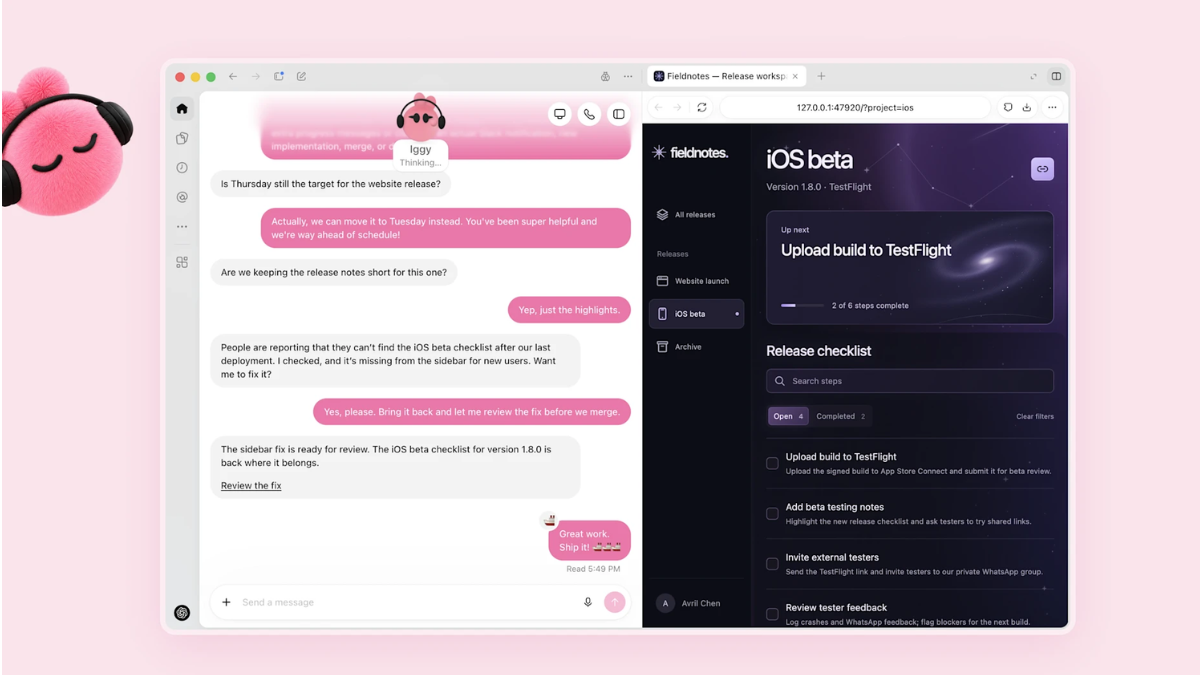
OpenAI is introducing a different way to delegate ongoing digital work with its new Dots AI agents. Unlike a conventional chatbot that waits for a new prompt, a dot can take responsibility for continuing work, track progress, conduct background research and return with results or questions when it needs the user’s input.
Each dot has its own cloud computer and browser. This means it can continue cloud-based work while the user’s own computer is switched off. OpenAI says Dots can research, analyse data, prepare documents and build software while using relevant information from previous conversations, connected applications and their own saved notes.
The system is powered by GPT-6 Astra, rather than operating independently of large language models as the original draft suggested. OpenAI describes Astra as its model for demanding reasoning, computer use, software engineering, research and professional work.
Dots can also delegate parts of a task to background agents and continue coordinating work while the user is away. OpenAI says proactive research can read information from connected sources and maintain private notes, while actions that modify apps or communicate externally remain subject to the relevant permissions and approvals.
How OpenAI Dots Work
ⓘ Sponsored: Unbox Daily HQ earns a commission if you buy through these links, at no extra cost to you. Prices shown are subject to change, and the actual price on Amazon at the time of purchase may vary from what is displayed here.
The biggest distinction is between the cloud computer provided by the dot and the user’s own computer.
A dot has its own cloud computer and browser for tasks that do not require access to the user’s local environment. Cloud work can continue when the user’s laptop or desktop is turned off.
Users can optionally connect their own computer. This allows a dot to access local files, applications or a local browser for supported tasks. However, local work is dependent on that computer remaining available; OpenAI says the connected computer needs to stay online with the ChatGPT app open while the dot uses it.
OpenAI also says a connected computer can be used when a website blocks the cloud browser or requires additional verification. In that situation, the dot can try the connected computer instead.
This creates an important distinction: the always-on capability primarily applies to the dot’s cloud environment. A task that specifically depends on the user’s physical computer cannot continue normally if that computer becomes unavailable.
Connected Apps, Messaging and Communication
Dots can connect to supported applications and services, including tools used for work and communication. OpenAI’s documentation lists channels such as ChatGPT, Slack and Microsoft Teams, with additional contact methods and integrations depending on availability.
The original claim that Dots lack all independent communication channels and must funnel everything through a personal inbox is therefore too broad. OpenAI says a dot can communicate through supported channels, while permissions determine what it can share and with whom.
Texting is also available as a limited beta for some Pro users in the US, using a third-party provider. Availability is restricted and it is not currently available in Business or Enterprise workspaces.
Safety and User Controls
OpenAI has built several layers of controls around Dots. Before a dot takes an action that could affect an account or share information, an automatic review considers the user’s instructions, permissions, custom rules and built-in safety requirements. Some actions require user approval or must be completed by the user.
For example, asking a dot to draft an email does not automatically give it permission to send that email. Users can establish custom rules specifying whether particular actions should be performed automatically, require approval or be handed back to the user.
OpenAI also cautions that dots can make mistakes. Important results should therefore be reviewed rather than treated as automatically correct simply because a task has been marked completed.
Essential Specifications for OpenAI Dots
| Specification | Details |
| Core model | GPT-6 Astra |
| Cloud environment | Dedicated cloud computer and browser for each dot |
| Initial setup | ChatGPT desktop app or desktop web |
| Mobile access | Available after desktop setup when the supporting mobile update is available |
| Eligible access | Pro, Business Premium and Enterprise, subject to region/workspace availability |
| Enterprise access | Initially off by default; administrator enablement required |
| Age requirement | 18 |
| Local computer access | Optional; requires a connected computer and ChatGPT app to remain available for local tasks |
| Background work | Research, recurring tasks, delegated work and follow-ups |
| Messaging | ChatGPT, Slack, Teams and other supported channels |
| Memory | Uses relevant ChatGPT memory plus dot-specific saved notes |
Availability and Subscription
The original draft described Dots as being limited to Pro and Business Premium, but OpenAI’s current documentation also lists Enterprise access.
For individual users, Dots are rolling out to Pro 100, Pro 200 and Pro 500 users who are over 18 and outside the European Economic Area, United Kingdom and Switzerland. Business Premium availability is broader, while Enterprise customers can access the feature when their workspace administrator enables it.
The first dot is included in eligible Pro and Business Premium plans at no additional charge. OpenAI says users will eventually be able to add more dots and scale their output by increasing speed or the amount of work handled each month. The company has not yet published the future pricing structure for those additional capabilities. Uncapped text chats arrive on the upgraded ChatGPT platform.
What About India?
For Indian users, the most important consideration is the distinction between cloud-based work and local-computer work.
Because a dot’s cloud computer operates independently of the user’s device, cloud-based tasks can continue even when the user’s computer is switched off. That makes the system fundamentally different from an agent that depends entirely on a user’s laptop or desktop remaining active.
However, the situation changes when a task specifically requires the user’s local computer, files or applications. Such work depends on the connected machine remaining online and available. If the local computer goes offline, that particular local task may be interrupted rather than automatically migrating to the cloud.
This distinction matters for anyone considering Dots for long-running professional workflows in which local software or files are essential.
Memory and Data Management
Dots maintain their own context and saved notes, while also receiving relevant ChatGPT memory and conversation context. OpenAI says disconnecting a connected service stops new access through that connection but does not remove information the dot has already obtained.
To delete the dot’s own context and saved memories, users need to delete or reset the dot. OpenAI says resetting deletes the dot, including its conversations, saved memories and scheduled tasks. Information stored separately—for example, files or conversations created elsewhere—can remain subject to the retention policies of those locations.
The Unboxed Truth
OpenAI Dots represent a shift from asking an AI one question at a time toward delegating an ongoing responsibility to an agent.
The important promise is not simply that a dot can perform a task. It is that the agent can continue working, track progress, research connected information and return for decisions when necessary.
That also changes the user’s responsibility. An autonomous agent can perform more steps without constant supervision, but OpenAI itself recommends reviewing important results because dots can make mistakes. For professional or business-critical workflows, the value of Dots will therefore depend on how reliably the agent handles the specific applications, permissions and tasks a user gives it.
Best for: Developers, researchers, data analysts, professionals and teams managing ongoing multi-step digital work.
Who Is This For: Users aged 18 and above who need persistent AI assistance across connected tools and projects.
Courtesy: OpenAI
OpenAI Dots are included at no additional charge for eligible ChatGPT Pro and Business Premium users. Enterprise users can also access Dots when the feature is enabled for their workspace. Availability varies by plan, region and workspace settings. OpenAI has not announced a separate standalone price for Dots.
OpenAI Dots are designed as persistent AI agents that can continue working through a dedicated cloud computer and browser, including background research and multi-step tasks. Meta’s Muse is a separate AI-agent initiative with its own availability, architecture and product approach. Because the two products have different rollout models and capabilities, they should be compared feature by feature rather than simply by subscription access or user reach.
Dots may be worth considering for users who regularly need ongoing, multi-step work across connected applications, research tasks, software development or data analysis. Their value depends on how well the agent handles the specific workflows you want to automate.
Users should also consider the level of oversight required. OpenAI says Dots can make mistakes, so important outputs and actions should still be reviewed. The feature is not limited to a particular age group or only to solo developers and data analysts.