Thursday, May 28, 2026 |Navi Mumbai
--:-- | --°C | AQI --
If it's not on Unbox Daily HQ, it's not a Launch. Every product, policy and brand launch in India. One hub. What's new?
Chrome’s new side-by-side AI helps you browse without switching tabs; an India rollout is expected to follow the US launch.
The Essentials
The Pulse
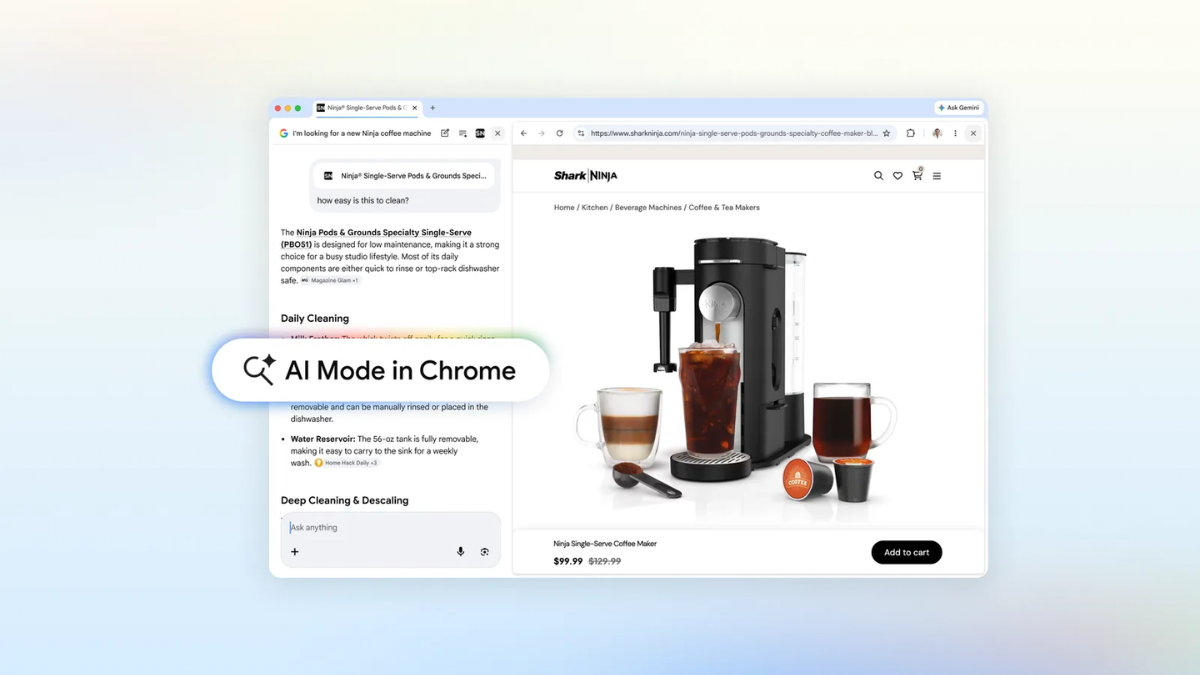
Chrome users in India, known for keeping dozens of tabs open while hunting for the best Amazon deals or compiling research papers, are getting a massive productivity boost. Google is rolling out “AI Mode”, a feature that lives right inside your browser window. Instead of flipping back and forth between a search engine and a website, you now get a side-by-side view. This means you can keep a product page open on one side and ask the AI specific questions about it, like “is this easy to clean”? on the other.
In a country where many students and professionals rely on budget laptops with limited screen real estate, the ability to search across multiple open tabs, including local lecture notes or PDFs is a significant upgrade. You aren’t limited to text; you can mix and match tabs, images, and files to get a tailored response. The update also integrates “Canvas” and image creation directly into the new search menu. While the U.S. is the current testing ground, the global expansion is imminent, meaning Indian users should keep an eye out for the new “plus” icon in their Chrome search bars.
The Snapshot
| Feature | Details |
| Model Name | AI Mode in Chrome |
| Key Functions | Side-by-side browsing, Search across tabs, PDF/Image support |
| New Tools | Canvas & Image Creation integration |
| India Price | Free (Standard Chrome Update) |
| Availability | Coming soon to India (U.S. live now) |
The Big Picture
ⓘ Sponsored: Unbox Daily HQ earns a commission if you buy through these links, at no extra cost to you. Prices shown are subject to change, and the actual price on Amazon at the time of purchase may vary from what is displayed here.
This move signals a shift from search being a destination to search being a persistent assistant. Globally, browsers like Arc and Microsoft’s Edge (with Copilot) have been nibbling at Chrome’s dominance by offering better multitasking tools. In India, where Chrome holds a massive market share, this native AI integration aims to keep users within the Google ecosystem. It represents the “browser-as-an-OS” trend, where the goal is to ensure a user never has to leave a single window to create, analyse or compare information.
The UDHQ. Take
Google is finally addressing the “tab fatigue” that plagues almost every Indian internet user. Whether you’re a student in Bengaluru juggling five research papers or a shopper in Delhi comparing air conditioner specs across three different sites, the side-by-side AI view is a legitimate utility, not just a gimmick. It turns the browser into a collaborative space rather than just a static window.
The real winner here is the “search across tabs” feature; we’ve all been in a situation where we know the info is in one of those 20 open tabs but can’t find it. By letting you query your own active session, Google is making the browser smarter than the user’s memory. It’s a free, high-value upgrade that makes Microsoft Edge’s sidebars look cluttered by comparison. It’s practical, it’s integrated, and it’s exactly what a modern browser should be doing in 2026.
Best for: Indian students and office workers who suffer from “tab overload” and need a faster way to cross-reference information.
Who Is This For: Perfect for: 18–35 year olds in India who manage heavy research or shopping tasks and want to stop switching between tabs.
The Checkout
Source
Google Official