Thursday, May 28, 2026 |Navi Mumbai
--:-- | --°C | AQI --
If it's not on Unbox Daily HQ, it's not a Launch. Every product, policy and brand launch in India. One hub. What's new?
Unbox Daily HQ evaluates the mechanical reality behind the newest professional videography tool from Apple.
The Takeaway
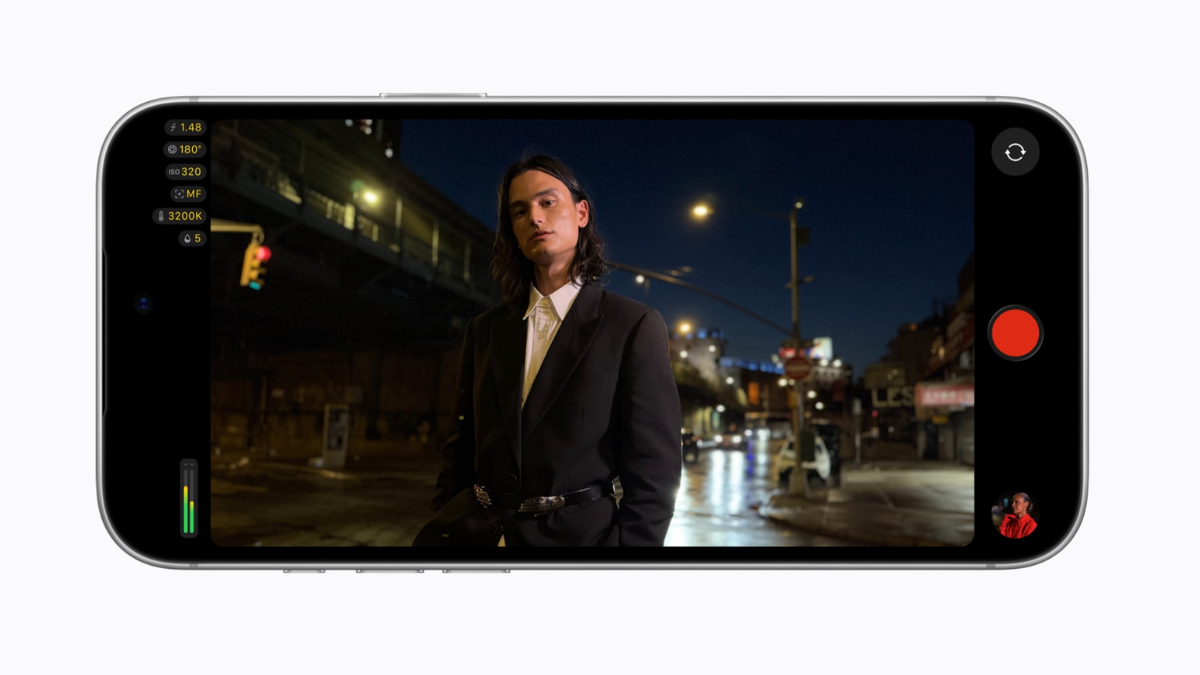
Apple has released Final Cut Camera 2.4, bringing a redesigned interface and new professional video controls, including support for the variable aperture of the iPhone 18 Pro. The free update was released on September 29 alongside iOS 27.
Variable aperture comes to Final Cut Camera
The biggest change in Final Cut Camera 2.4 is support for the variable aperture built into the iPhone 18 Pro’s 48MP Fusion Main camera.
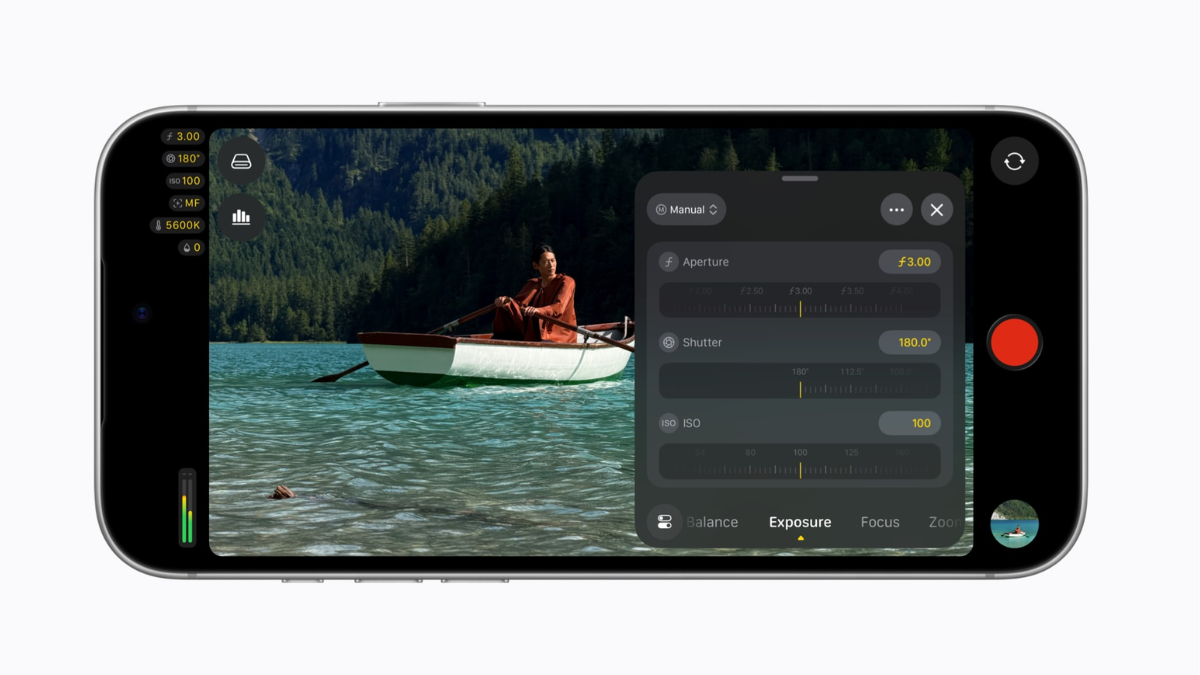
Users can manually select between ƒ/1.48, ƒ/1.8, ƒ/2.8 and ƒ/4.0, giving them control over exposure and depth of field. Apple says the aperture can also be used with aperture-priority, shutter-priority and manual modes.
This is a hardware-based camera feature rather than a software simulation. The iPhone 18 Pro itself has a variable-aperture Main camera, while Final Cut Camera provides the controls needed to adjust it during video recording. Apple says opening the aperture to ƒ/1.48 can also create a shallower depth of field and bokeh, while narrower settings provide greater depth of field.
ⓘ Sponsored: Unbox Daily HQ earns a commission if you buy through these links, at no extra cost to you. Prices shown are subject to change, and the actual price on Amazon at the time of purchase may vary from what is displayed here.
More professional monitoring controls
Final Cut Camera 2.4 also expands its monitoring tools. With iOS 27, creators can use the RGB Parade and histogram to monitor colour channels, exposure and overall image levels. The app also provides false-colour and clipping indicators with adjustable threshold settings.
Apple has redesigned the interface to make controls such as shutter angle, ISO and white balance easier to access. Focus peaking has also been improved with sensitivity controls.
A new tally light indicates when recording is underway. A two-finger tap can clear the viewfinder interface so creators can concentrate on the image while shooting.
Genlock and clean SDI output
Final Cut Camera 2.4 also includes tools aimed at more advanced production workflows.
The app’s Genlock Offset setting can compensate for image artefacts when recording a display or for latency differences between the iPhone and other cameras using genlock. This can be useful in multi-camera or studio environments where timing between sources needs to be managed carefully.
For broadcast-oriented workflows, Apple also supports Clean SDI Out through an HDMI-to-SDI converter. The iPhone does not have a native SDI connector, so additional hardware is required to convert the HDMI signal into SDI.
Apple describes the feature as enabling a clean video signal for streaming in broadcast-quality workflows. However, the final quality of a stream will still depend on the complete production chain, including capture hardware, network conditions and encoding settings.
Variable aperture arrives on the iPhone 18 Pro series at Rs 1,64,900
ProRes and Apple Log support
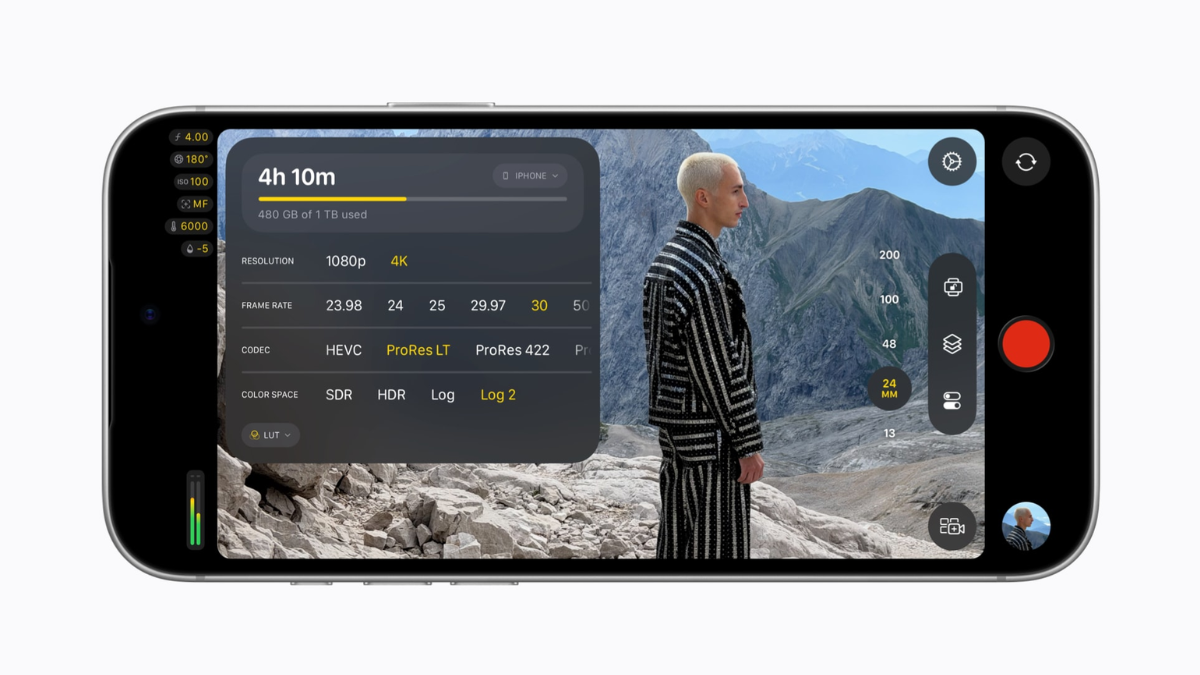
Final Cut Camera continues to support professional recording formats and workflows, including ProRes and Apple Log. The app can also apply Cinematic mode effects to regular video, allowing creators to adjust bokeh later in Final Cut Pro.
For creators recording high-bitrate formats such as ProRes, storage capacity and device temperature remain practical considerations. However, claims that Indian outdoor temperatures above 35°C automatically guarantee severe thermal throttling or immediate screen dimming are not supported by the Apple documentation reviewed for this article and should not be presented as a specific operating limit.
Final Cut Camera verified specification breakdown
| Feature | Reality |
| Software Price | Free download |
| Hardware Required | iPhone 18 Pro or Pro Max |
| OS Requirement | iOS 27 minimum |
| Aperture Range | f/1.48 to f/4.0 |
| Service Network | Calibration tools restricted |
Apple’s current iPhone 18 Pro specifications confirm that the 48MP Fusion Main camera has variable aperture options of ƒ/1.48, ƒ/1.8, ƒ/2.8 and ƒ/4.0.
The Unboxed Truth
At Unbox Daily HQ, the important change in Final Cut Camera 2.4 is not simply another collection of software controls. Apple is combining the professional controls in Final Cut Camera with the variable-aperture hardware of the iPhone 18 Pro.
That makes the update particularly relevant to creators who want more direct control over exposure and depth of field while recording video.
The bigger question for professional users is workflow. Features such as Genlock Offset and Clean SDI Out can make the iPhone more useful in advanced production environments, but SDI workflows require additional hardware, while high-bitrate recording demands adequate storage and thermal headroom.
For creators working primarily in controlled environments, the combination of variable aperture, monitoring scopes, ProRes, Apple Log and professional exposure controls provides a considerably more production-focused camera workflow than a standard smartphone video app.
Who Is This For
Professional creators, filmmakers, studio-based production teams and advanced mobile videographers who want manual exposure, variable aperture and professional monitoring tools from an iPhone-based video workflow.
Courtesy: Apple
Yes. Final Cut Camera is available as a free download on the App Store. Version 2.4 adds support for variable-aperture controls on the iPhone 18 Pro, while features such as RGB Parade and histogram require iOS 27. Clean SDI output requires additional HDMI-to-SDI hardware.
Final Cut Camera 2.4 can directly control the variable aperture of the iPhone 18 Pro’s Main camera, allowing users to adjust the physical aperture between ƒ/1.48 and ƒ/4.0. Blackmagic Camera is a separate professional video app with its own manual controls and workflows, but it does not provide access to Apple’s proprietary variable-aperture control through the iPhone 18 Pro hardware.
Final Cut Camera 2.4 also includes Genlock Offset and Clean SDI Out support for more advanced production workflows.
The answer depends on the user’s workflow. Final Cut Camera 2.4 is particularly relevant to professional and advanced creators who want manual exposure controls, variable aperture, ProRes, Apple Log and professional monitoring tools on a compatible iPhone.
For outdoor production, creators should also consider factors such as device temperature, storage requirements and the demands of recording high-bitrate formats.