Thursday, May 28, 2026 |Navi Mumbai
--:-- | --°C | AQI --
If it's not on Unbox Daily HQ, it's not a Launch. Every product, policy and brand launch in India. One hub. What's new?
Apple's redesigned Screen Time safety suite introduces stricter web browsing rules and blocks violent imagery across FaceTime.
The Takeaway
Apple distributes these native parental controls as free software upgrades. All devices in a Family Sharing group must install the version 27 update for the system to work properly. The tech giant partnered with medical professionals to integrate helpful reference material directly into the user interface. Parents can visit a newly launched web portal for detailed configuration instructions.
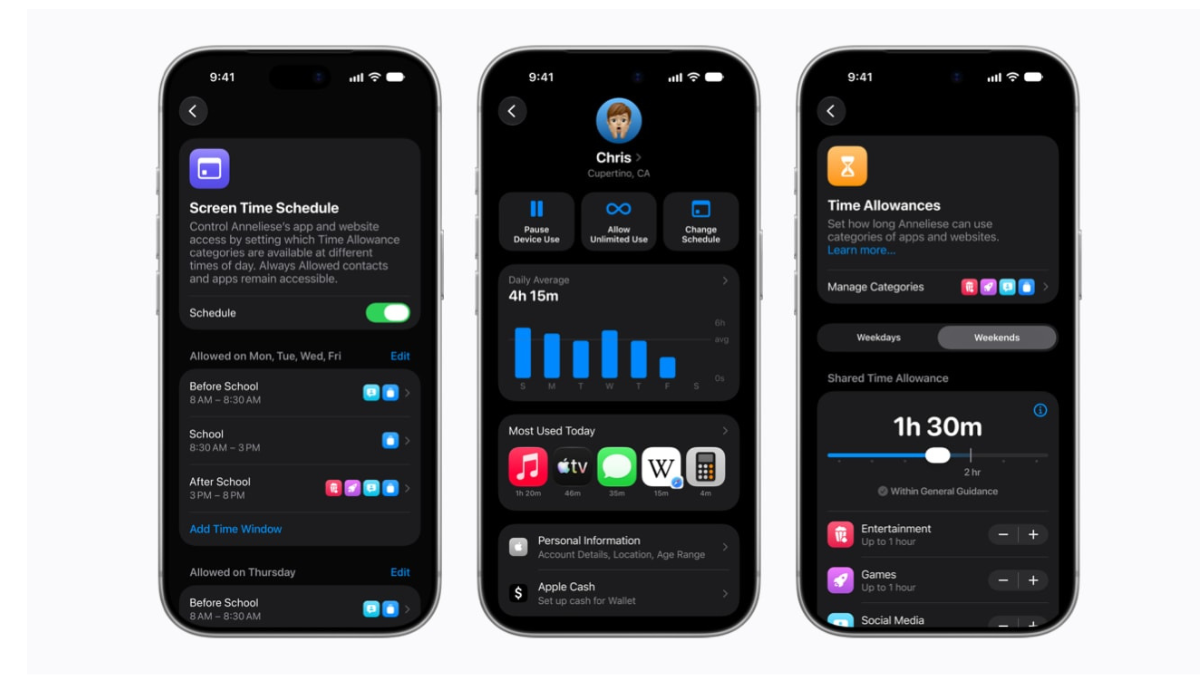
The redesigned Screen Time dashboard gives caregivers an immediate view of device usage alongside one-tap buttons to adjust limits instantly. Strict default settings automatically activate for children under 13 years old, including the existing Ask to Buy purchasing restriction.
The most significant shift from previous iterations is how the Communication Safety system handles live media. The software now actively detects and blocks gory or violent imagery during active FaceTime calls. Earlier versions only scanned for nudity within static photos or recorded videos.
Screen Time safety suite specifications
| Feature | Confirmed detail |
| Supported operating systems | iOS 27, iPadOS 27, macOS 27, watchOS 27, visionOS 27 |
| Pricing | Free system update |
| Default activation age | Under 13 years old |
| Restricted content filter | Nudity, gore, violent imagery |
While third-party applications have offered similar monitoring tools for years, these native system integrations create a much harder barrier for kids to bypass. The digital landscape continues to evolve rapidly, and Siri AI brings cross-device memory to the 2027 software updates alongside these improved family management features.
ⓘ Sponsored: Unbox Daily HQ earns a commission if you buy through these links, at no extra cost to you. Prices shown are subject to change, and the actual price on Amazon at the time of purchase may vary from what is displayed here.
Indian households can download these updates immediately. Apple does caution that specific language support or feature availability might vary by region or exact device model. Surprisingly, you do not need the newest hardware to access these protections, provided your older phone or tablet supports the version 27 operating system.
The Unboxed Truth
Unbox Daily HQ recommends installing the Screen Time update immediately to secure your family’s electronics. You gain highly specific control over device usage without paying a monthly subscription fee for third-party software. Blocking violent content during live video calls specifically solves a major blind spot that previous parental filters ignored.
Best for: Caregivers looking for native internet safety tools that sync across multiple devices.
Who Is This For: Parents of children aged 5 to 16 years old.
Courtesy: Apple
The Screen Time safety suite is available as a free system update across compatible devices. Caregivers can download it immediately by installing the version 27 operating system on all family hardware. Indian households receive immediate access, though specific language availability may vary across local regions.
The Screen Time safety suite actively blocks violent and gory imagery during live FaceTime calls rather than only scanning static photos. Unlike third-party applications that offer similar monitoring tools, these native system integrations establish a much harder barrier for children to bypass. This live protection closes an important security gap.
Yes, installing the Screen Time update is worthwhile because it delivers robust parental controls without requiring a paid subscription. It is designed for parents of children aged 5 to 16 years old who need synchronised safeguards. The system effectively eliminates blind spots by restricting graphic visuals across live calls.